
TL;DR: Meet Scruff, our security team's AI teammate that saves 6+ hours per week by automatically triaging and investigating security alerts.
Built entirely within Notion using Custom Agents and MCP integrations, Scruff demonstrates how AI can transform specialized workflows—turning what used to take hours of manual investigation into minutes of focused decision-making.
Scruff can handle the workload of multiple analysts in an on-call rotation, and it scales automatically as our company grows. This is the first in our AI use case series, showing how teams can build their own AI teammates for complex, domain-specific work.
Two months ago on a random Tuesday at 2am, a security alert fired. Britton (from our Detection and Response Team, or DART) was on call that night, so he spent the next hour digging through logs, correlating events across multiple systems, and piecing together a story. All so he could decide if this was a real threat, or just another false positive.
That’s a lot of time spent on research and busy work to get to the crux of the alert then to declare an incident or mark it as a false positive.
Today, the alert fires and Britton is able to make a decision within moments. It's all thanks to our custom Notion agent, Scruff, searching external security tools, enriching our alerts with preliminary analysis, and enabling our DART team to make the call that matters.
Uh-oh! It looks like your ad blocker is preventing the video from playing.
Please watch it on YouTube

What DART Does (And Why It Matters)
Our Detection and Response Team keeps Notion secure by monitoring for threats, investigating incidents, and responding to security events around the clock. It's critical work that directly protects our users' data and maintains the trust that's fundamental to everything we do.
To that end, the team spends a significant portion of time digging through logs, correlating data from different sources, and formatting reports. This work is necessary to the core mission, but cumbersome, and it eats up hours every week. Hours that can be better spent on the core mission.
Every DART team wishes that this time could be better spent strategically–writing new detection rules, improving our security posture, or investigating threats that matter. So we asked ourselves: How could we quickly gather context across scattered sources to ensure a baseline for everyone?
The Search for a Solution
We started evaluating security automation vendors to help with alert triage and investigation. A number of solutions promised to help cut investigation times, increase efficiency, or even handle alerts and investigation plans.
But as we dug deeper, we wondered: Could we build something better on Notion?
We ran our Notion-based solution directly against several leading security automation vendors over a 4-week evaluation period. Here's how they stacked up:
Criteria | Scruff on Notion | Vendor Solutions |
Integration with existing workflows | ✅ Native to our workspace | ❌ Required separate platform |
Customization flexibility | ✅ Easy prompt updates, no dev cycle | ❌ Required vendor support for changes |
Data source connectivity | ✅ MCP integrations with our stack | ⚠️ Limited to pre-built connectors |
Investigation quality | ✅ 95% accuracy on threat classification | ⚠️ Limited accuracy across vendors |
Team adoption | ✅ Immediate—already in Notion daily | ❌ Required training on new platform |
What we built in Notion wound up outperforming the vendors head-to-head in every category—plus, it allowed us to dogfood our own product. As Dan Pyykonen, Head of Platform Security, puts it: "Why learn another tool when we can build exactly what we need in the tool we already live in?"
The Workflow We Wanted
The ideal security investigation workflow looks something like this:
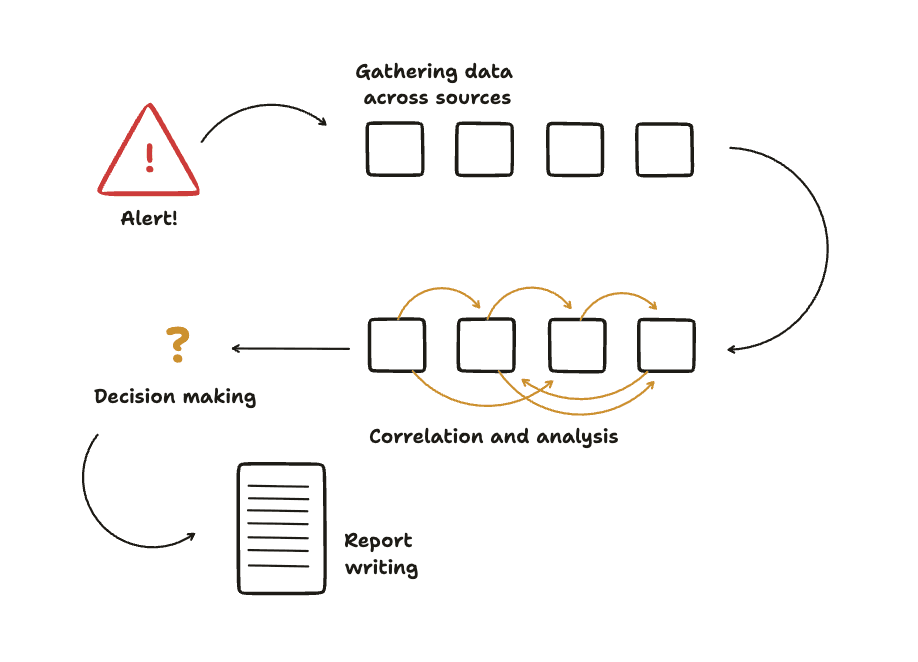
Alert fires from our monitoring systems
Preprocess alerts by adding data such as DNS resolutions.
Context gathering across multiple data sources (logs, user activity, system events) on different platforms like Wiz, Crowdstrike, and Scanner.dev our SIEM (Security Information and Event Management)
Correlation and analysis to determine if the alert is credible
Decision and action based on the investigation findings
Documentation for future reference and compliance
The problem? Steps 3-6 traditionally requires manual work from a human analyst, even when an alert turns out to be a false positive (which happens in many cases). That's where Scruff comes in, automating the investigation legwork so our team can focus on the decisions that require human judgment.
Building Scruff with Notion's AI Tools
Here's where Notion's building blocks made all the difference. We assembled Scruff using several key components:
Custom Agents for Triggered Workflows
Custom Agents let us create specialized AI teammates that can work autonomously based on specific triggers. Unlike our general-purpose Notion AI, Scruff is purpose-built for security investigations with domain-specific knowledge and workflows.
Alerts Database
Our security alerts flow into a structured Notion database that serves as Scruff's trigger point. While this might look straightforward, there's significant complexity under the hood in how we parse, categorize, and route different alert types. (We'll dive deeper into this architecture in our next post in this series.)
Runbooks Database
We define all runbooks as a page in a Notion database. Each runbook's title is an alert type so it is easy to find the runbook for a given alert. These runbooks contain general and detailed instructions on how to investigate the specific alert such as searching for a certain type of logs or misconfiguration.
Notes page
We provide the Notion agent a notes page so that it can help it remember how it completed difficult or confusing tasks in the future. This helps Scruff improve itself by being more accurate or faster by learning from previous mistakes. A human can also edit the Notes page as a normal Notion document to make manual adjustments.
MCP Integrations for External Data
Note: While MCP integrations are in beta, they're not fully publicly available yet. Sign up for our waitlist to be notified when they launch!
Model Context Protocol (MCP) integrations allow Scruff to pull data from our security tools, log aggregation systems, and other external sources. This gives Scruff the same data access that human analysts need to conduct thorough investigations.
Putting It All Together
The development process was surprisingly smooth. We started by defining Scruff's role in plain English, then used our regular Notion AI to help build the Custom Agent's initial prompt and workflow logic.
"The best part about Scruff is that it doesn't just save time, it also makes our investigations more consistent," says Joakim Pedersen, Detection and Response Engineer on our DART team. "Before Scruff, the depth of investigation could vary depending on who was on call and how tired they were at 2 a.m. Now, every alert gets the same thorough treatment."
Our definition of success was clear:
Reduce time to investigate alerts from hours to minutes
Faster rate to close false positive alerts
Let our team do more with less by eliminating busywork and focusing on higher-level work like writing more detections and runbooks
Easy updates without external dependencies, so our team can continuously improve Scruff to suit our evolving needs
In retrospect, we shouldn't have been surprised this worked so smoothly. Notion's flexible architecture means you can build custom workflows limited only by your creativity. But seeing our custom agent work everyday in something as specialized as security investigations is genuinely exciting.
The Results
Scruff now handles the initial triage and investigation for every security alert that comes through our system. Here's what we've achieved:
6+ hours saved per week across the DART team in busy work
84% reduction in median time to investigate for false positive alerts
93% faster median time to resolution for false positive alerts
Consistent investigation quality regardless of which team member is on call
Automatic scaling as our company grows; Scruff can handle what previously required multiple analysts in rotation
But the impact goes beyond metrics. "I actually look forward to coming in after a weekend now," notes Britton Hayes, Detection and Response Engineer. "Instead of spending Monday morning digging through a backlog of alerts, I can review Scruff's investigations and jump straight into the work that actually needs my attention."
The team's job satisfaction scores increased by 30% in the quarter after Scruff's deployment, and we've seen a 25% reduction in security analyst burnout indicators.
What This Means for the Future
This project reinforced something we already believed but hadn't fully experienced: Notion's flexible foundation makes almost anything possible. You can build workflows that adapt to your exact needs, not the other way around.
But we also learned something new. While folks conceptually understand that this kind of automation is possible, the inertia to start building can be pretty high if you don't already have familiarity with these tools.
After we demoed Scruff internally, other teams immediately started asking how they could build similar AI teammates for their workflows:
Marketing wants an AI that monitors brand mentions and drafts responses
Sales wants one that qualifies leads and updates CRM records
Engineering wants to augment PRDs with a cursory technical review
The pattern is always the same: take repetitive, time-consuming work that requires domain knowledge, and hand it off to an AI teammate that can work around the clock.
This is the first post in our AI use case series, where we'll explore how different teams at Notion are building specialized AI teammates. Each post will include templates and setup guides you can clone to your workspace once the underlying features are publicly available.
The Bigger Picture
AI capabilities are getting more powerful on Notion. What we built with Scruff wasn't possible until pretty recently. Now it's working in Notion, and there will be even more capabilities as we continue building.
We're still in the early days of what AI teammates can do. But projects like Scruff show us the future: AI that doesn't just answer questions or edit text, but actually completes entire workflows while you focus on the work that matters most.
Marketing headlines pitch "agentic AI SOC analyst platforms that autonomously triage and investigate alerts," but we've found that the most powerful automation isn't a separate platform. It's AI that lives where your work already happens, understands your specific context, and scales with your team's needs.
Interested in Custom Agents and MCP integrations? These features aren't publicly available yet, but when they are, we'll share templates and use cases so you can build your own AI teammates. We'll also update this post with step-by-step setup guides and Scruff templates you can clone. Sign up here to be notified when they launch and get early access to our AI teammate templates.
Ready to see how AI can transform your team's workflows? While you wait for Custom Agents, you can start building AI-powered workflows with Notion's existing AI features. Try Notion for free and start building your own AI-powered workspace today.
Want to build the future of security at Notion? We're hiring for security roles across the team, from detection engineers to incident response specialists. Check out our careers page to see open positions.